
How To Control a Relay on a Commend ET908H using a CoCoS Script
Case description
To control an output on a Commend ET908H device we can use the Commend ET908H API. To enable the API / webhooks on the ET908H please consult the device manual. The outputs can used to open a door, open a gate, switch on light etc.
Application
To control an ouput on the ET908H, in an standard IoIP system it's most common to use and ICX message.
Solution / Resolution / How To
1. Create script for output control
For controlling relays/outputs on our ET908H we have to create a script.
| Step 1: Navigate to "Programming / Scripts" (or "System / Scripts" in versions before 5.1.0), and click on the new script button. |
|
| Step 2: Paste the following script into the "Script" field. |
(See the script bellow) |
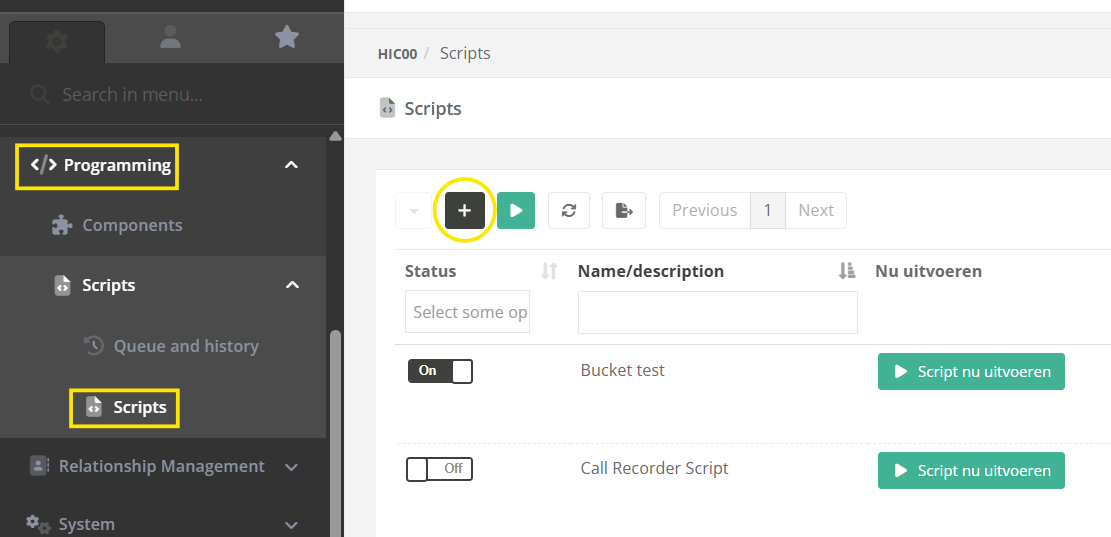
The following script can be used for one device
//     ____       ____     ____    ____            _       _
//    / ___|___  / ___|___/ ___|  / ___|  ___ _ __(_)_ __ | |_
//   | |   / _ \| |   / _ \___ \  \___ \ / __| '__| | '_ \| __|
//   | |__| (_) | |__| (_) |__) |  ___) | (__| |  | | |_) | |_
//    \____\___/ \____\___/____/  |____/ \___|_|  |_| .__/ \__|
//                                                  |_|
// ---------------------------------------------------------------------------------------------------
//   License    : Open Source / GNU
//   Created by : Concera Software / RL
//
//   Description:
// 	  Control the a relay on a ET908H board using the webhook (api) on the ET908H
//
//   Comments   :
//   - Compatible with CoCoS v4
//   - Requires remote user credentials for the Commend Symphony BF
//     device that is linked to the door you want to open.
// ---------------------------------------------------------------------------------------------------

// ---------------------------------------------------------------------------------------------------
// DEBUG CONFIG
//
// Enable debug if run manually (detected by empty $source variable) or
// when the set to 1 (always).
//
$_DEBUG 		= 1 || (empty($source)?1:0);	// 0 = no, 1 = always write request result to logbook
$_MAX_LOG_LEN 	= 2048; // maximum number of characters in a log-entry.

// ---------------------------------------------------------------------------------------------------
// BASE CONFIGURATION
//
// Device configurations:
//
$host = '10.10.10.10';          // Host / IPAddress of the device to preform
                                // the remote action on.
$remoteUsername = 'cocos';      // The username of the remote user account.
$remoteUserPassword = 'cocos';  // The password of the remote user account.

// Relay configurations:
$relay = 1;					    // The relay to use for dooropening.
$doorOpenTimeInSeconds = 1;     // The time in seconds that indicates how
                                // long the relay / door must be open for.

// ---------------------------------------------------------------------------------------------------
// INIT VARIABLES.
//
$url = 'https://'.$host.'/cgi-bin/remotecontrol/relais.cgi?relais='.$relay.'&action=dooropener&dooropentimer='.$doorOpenTimeInSeconds;

// ---------------------------------------------------------------------------------------------------
// CALL THE REMOTE DOOROPENER ACTION.
//
$urlGetResult = $cocos->urlGet($url, array(
	'Authorization: Basic '. base64_encode($remoteUsername.':'.$remoteUserPassword)
));


// ---------------------------------------------------------------------------------------------------
// WRITE INFO TO LOGBOOK
//
// If debug is enabled by assigning the value 1 or higher to the $_DEBUG variable, the script will
// write call and result data to the logbook with type info.
//
if ($_DEBUG>0){

	// clean up result by removing tabs, spaces and line breaks.
	$urlGetResult = str_replace("\t","",$urlGetResult); // remove tab
	$urlGetResult = str_replace(" " ,"",$urlGetResult); // remove space
	$urlGetResult = str_replace("\n","",$urlGetResult); // remove new line
	$urlGetResult = str_replace("\r","",$urlGetResult); // remove return

	// format single line url and result entry for the logbook.
	$info = (empty($source)?"":"SOURCE: ".$source.", ")."URL : $urlGetResult, RESULT : $result";

	// log the request and the result.
	$cocos->logInfo(substr($info,0,$_MAX_LOG_LEN));

	// if the $info string is exceeding the limit of 240 characters.
	if (strlen($info)>$_MAX_LOG_LEN){ $cocos->logInfo(substr($urlGetResult,0,$_MAX_LOG_LEN));	}

}
References
Describe where to find external answers or extra information's